Branch: what should a design tool know before it draws?
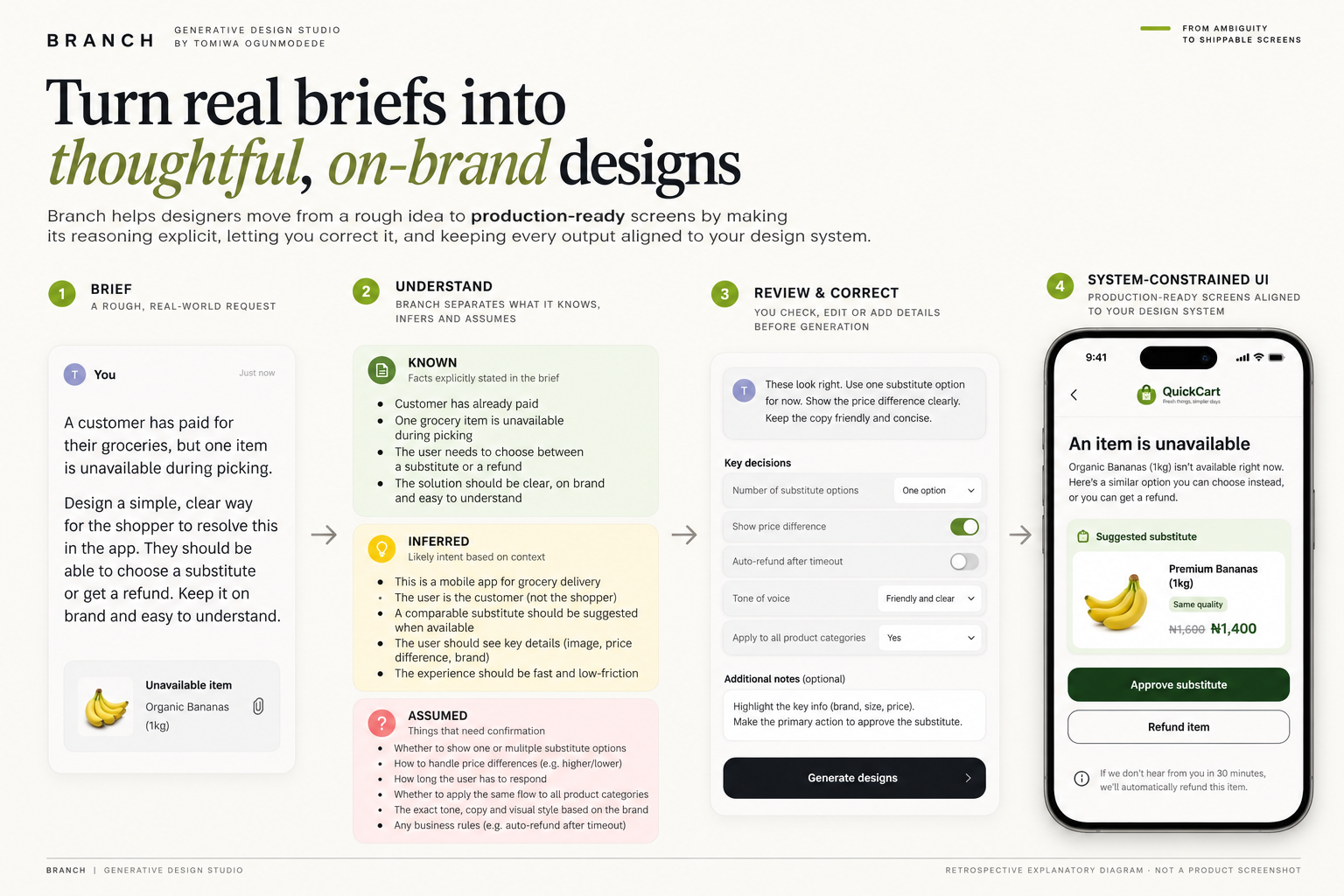
AI can draw a beautiful screen while misunderstanding the thing you asked it to solve. I built Branch to make its interpretation inspectable before generation, then give people room to correct it.
The itch
A generative design tool can produce a convincing result very quickly. That becomes a problem when the model has quietly made up the product rules. You notice the mistake after the screens are already there, when correcting it costs more than asking first.
Branch began after I explored a Careem design assessment. The product is independently mine, and I continue developing it for real work.
The decision
I made the audit a product step. Branch can inspect a brief, design or user flow, distinguish what it knows from what it inferred, point to gaps, and leave a space for the user to correct its interpretation before drawing.
A validated structured representation feeds a constrained renderer with deterministic design-system checks. The point is to make a wrong assumption visible while it's still cheap to change.
Where I've used it
I've used Branch in Lion Hospitality Partners work, Neustack client projects and the Flex Academy case study. Those are real working uses, not a claim about external customer adoption.
The public grocery fixture can be opened and challenged at branch.neustackstudio.com. A complete live-browser acceptance run verified the displayed states; a downloadable before-and-after screen recording is still a separate visual asset.
Scroll the frame sideways to read the full width.
A worked product decision
Branch takes a rough brief, identifies what the brief states, what it infers and what it assumes, and gives the designer a chance to correct that interpretation before generating screens. The worked Careem challenge used a paid grocery order in which an item ran out during picking. The operational decision is whether a substitution, a refund or a customer confirmation is required before the order proceeds.
I built the design companion and the deterministic design-system layer that checks generated screens against selected tokens. The preset grocery fixture is deterministic and works without a model call. Live model generation for new briefs is a separate path. The actual demo was tested in a browser on 14 October 2026; this case makes no external conversion or model-quality claim.
A real run through the grocery example
Scroll the frame sideways to read the full width.
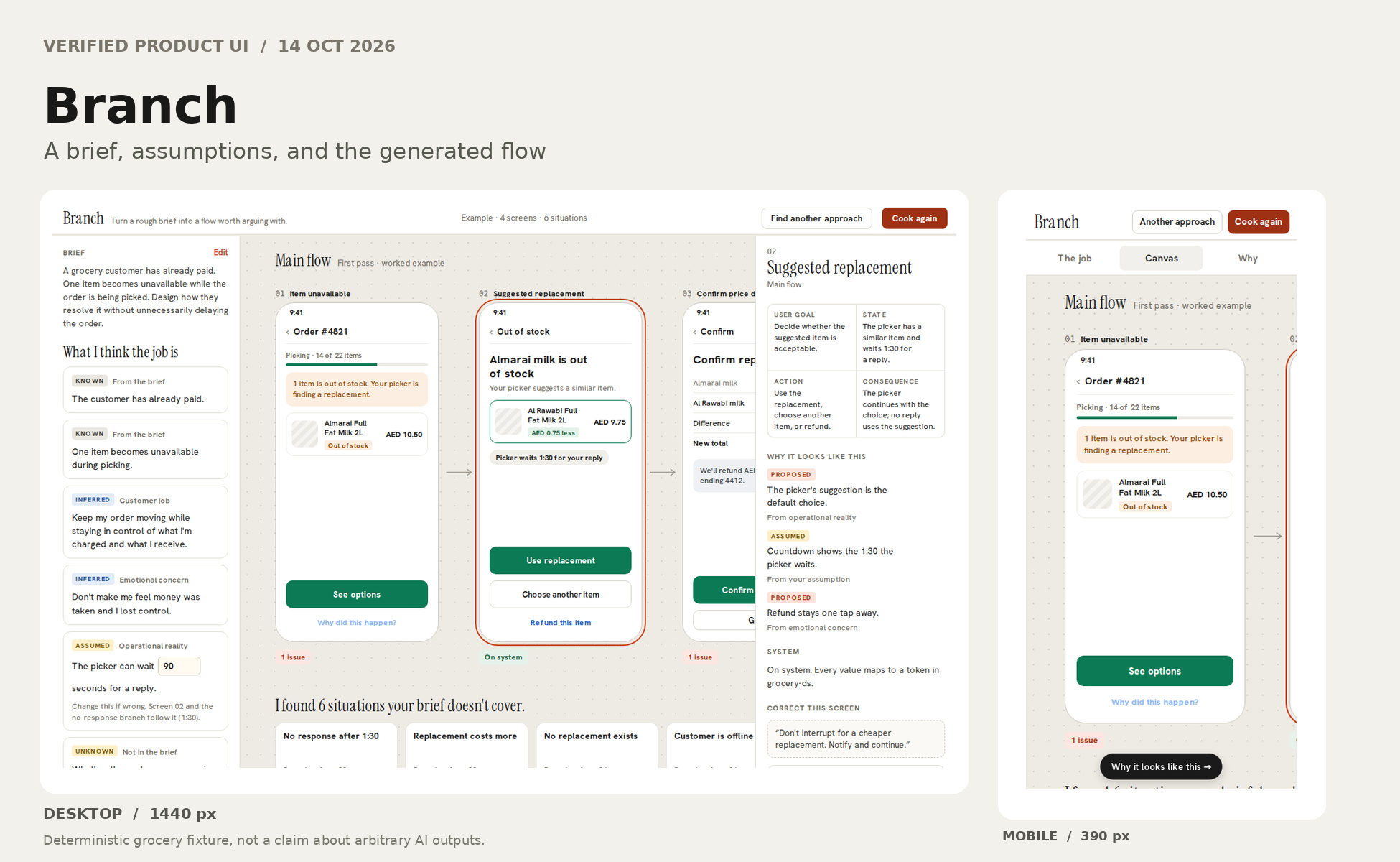
Production browser test, 14 October 2026. I opened the public fixture at branch.neustackstudio.com and pressed Cook first pass. Branch presented two known facts, two inferred user concerns, one adjustable assumption about the picker waiting 90 seconds, and one unresolved question about push notifications. These categories stayed separate on screen.
The fixture drew four distinct product screens: item unavailable, replacement choice, price difference confirmation and order continuing. Below them were six uncovered situations, including no customer response, an expensive substitute, no replacement, customer offline, Arabic reading order and a card unable to take an extra charge. Expanding the timeout branch showed two further states.
Selecting the first screen exposed a contrast violation: an action link had 2.1:1 contrast against the 4.5:1 text minimum. The inspector offered a semantic token fix and a place to write a correction before redrawing. Those are inspected interface states from a real browser session, not evidence that every correction option or arbitrary AI-generated flow has passed acceptance.
Try the public working fixture: https://branch.neustackstudio.com/ . The hero artwork above is labelled as an explanatory diagram; it is not a screenshot of that session.